Cover Letter Generator: Get a Job-Ready Draft in 2026

A cover letter generator only works if it has real material to pull from. Feed it your actual background and the actual job posting, and it can produce a draft that sounds like you and speaks to the role. Feed it nothing, and you get filler. This guide covers what these tools actually do, how to use one well, and what to change before you hit send.
What a Cover Letter Generator Actually Does (and Doesn't)
A cover letter generator takes structured input, your work history, the target job description, sometimes your resume, and turns it into a formatted draft with an opening, body paragraphs, and a closing. It handles the parts people procrastinate on: figuring out how to open without a cliché, organizing your experience into a narrative, and matching the letter's length to convention.
What it doesn't do is know things you haven't told it. It can't invent a specific project outcome you never mentioned, and it can't guess why you actually want this job over the dozen similar ones you've applied to. Any tool that claims to produce a letter that's fully ready to send without asking for details about your background is either working from generic templates or overpromising.
The honest framing: a generator gives you a structured first draft built from real inputs. The value is in skipping the blank page and the formatting decisions, not in skipping your own judgment about what gets said.
- A cover letter generator is only as good as the resume and job description you give it.
- The draft it produces is a starting point, not a finished submission.
- Pairing the letter with a tailored, ATS-checked resume is what actually moves an application forward.
How LairIQ's Cover Letter Generator Works: From Job Post to Draft
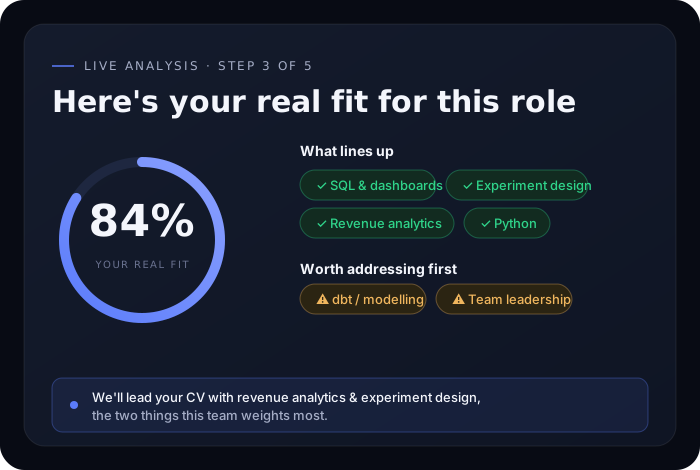
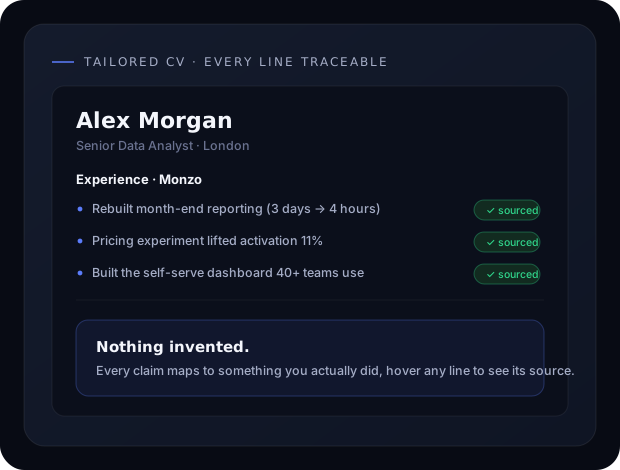
LairIQ builds the letter from two sources at once: your stored career history and the specific job description you're applying to. Instead of generic "results-driven professional" language, it pulls actual achievements, tools, and details from your background and lines them up against what the posting is asking for.
This is where Career Memory matters. When you keep one record of your roles, projects, and measurable outcomes, every cover letter you generate afterward draws from the same accurate source instead of you retyping your history each time or misremembering a detail under deadline pressure. You paste in a job posting, and the generator matches relevant experience to the listed requirements, prioritizing what's actually applicable to that role over a one-size-fits-all summary.
The output is a draft organized around the job's stated needs, not a generic template with your name swapped in.
Step-by-Step: Generating Your First Cover Letter
- Add your career details once. Roles, dates, responsibilities, and specific outcomes. This becomes the source material for every future letter, so it's worth doing properly the first time.
- Paste in the job description. The full posting, not just the title. Requirements, preferred qualifications, and language about the team or mission all give the generator more to match against.
- Generate the draft. The tool aligns your background with the posting's priorities and produces a structured letter: opening, two or three body paragraphs, and a closing.
- Read it against the job posting side by side. Check whether the draft actually addresses what the employer asked for, not just whether it sounds professional.
- Edit for specifics and voice. This is the step most people skip, and the one that determines whether the letter gets read past the first paragraph.
If you want to see the output before creating an account, the free sample shows what a generated draft looks like from real inputs.
5 Things to Edit Before You Send Any Generated Cover Letter
- The opening line. Generated openings tend to restate the job title. Replace it with something specific: why this company, this team, or this problem caught your attention.
- At least one detail only you would know. A conversation with someone at the company, a product you've used, a specific reason the role fits your trajectory. This single sentence does more to signal genuine interest than any amount of polished phrasing.
- Numbers and outcomes. Confirm every metric in the draft is accurate. If the generator pulled a figure from an old version of your career history, fix it before it becomes a factual error in a job application.
- Tone consistency. Read it aloud. If it doesn't sound like something you'd say in an interview, adjust the wording until it does.
- The closing paragraph. Generic closings ask to "discuss further." A better closing references something specific about next steps or why you're confident you'd contribute quickly.
Matching Your Cover Letter Tone to the Job and Company
A cover letter for a fast-growing startup and one for a public agency shouldn't sound the same, even if the underlying qualifications are identical. Startups tend to favor direct, slightly informal language and a clear point of view. Larger, more established organizations often expect a more measured, formal tone, especially in regulated industries like finance, healthcare, or law.
Look at the job posting itself for cues. Casual language, something like "we're looking for someone who loves solving hard problems", suggests you can loosen your tone. Formal, credential-heavy postings suggest you should keep things buttoned up. When you generate a draft, adjust the register to match what the posting signals rather than defaulting to one voice for every application.
Common Mistakes That Make Generated Cover Letters Sound Generic
- Sending the first draft unedited. The single biggest giveaway. Hiring managers can tell when a letter wasn't reviewed against their specific posting.
- Repeating the resume instead of adding context. A cover letter should explain the "why" behind your experience, not restate the "what" that's already on your resume.
- Vague enthusiasm with no specifics. Phrases like "I am excited about this opportunity" without any detail about what specifically excites you read as filler.
- Ignoring the job description's actual language. If the posting emphasizes cross-functional collaboration and your letter never addresses how you work across teams, you've missed the point of tailoring it.
- Using the same letter for every application. Even with a generator, the letter needs to be regenerated or re-edited per job. A recycled letter is usually easy to spot.
Cover Letter Generator vs Writing From Scratch: When Each Makes Sense
| Situation | Better approach |
|---|---|
| Applying to many roles in a short window | Generator, edited per posting |
| One high-priority role you've researched deeply | Generator as a starting structure, heavier manual editing |
| Career change or unconventional background | Generator for structure, but expect to rewrite the narrative sections yourself |
| You already have a strong letter template that's worked before | Adapt manually, using the generator only to speed up formatting |
The generator's advantage is speed and consistency, not replacing your judgment about what story to tell. For high-stakes applications, use it to handle structure and formatting so you can spend your time on the parts only you can write: the specific reasons this role and this company matter to you.
Pairing Your Cover Letter With an ATS-Optimized Resume
A strong cover letter doesn't compensate for a resume that gets filtered out before a person ever reads it. Most mid-size and large companies route applications through an applicant tracking system first, and a resume with formatting issues or missing keywords can get screened out regardless of how good your letter is.
Before you submit anything, run your resume through the ATS Resume Checker to catch formatting problems and keyword gaps specific to the job description. If you're still building or updating your resume, see our guides on building a resume that passes ATS checks and choosing the right resume builder for a deeper walkthrough of what these systems actually screen for.
A strong cover letter doesn't compensate for a resume that gets filtered out before a person ever reads it.